Throttle Node
Quick Reference
- Key Expression: FEEL expression evaluated on each record. Records with the same result share one limit.
- Events per Period: Records allowed per key in each period. A whole number from
1to2,147,483,647. Leave blank to use the default. - Period (seconds): Length of each period in seconds. A whole number from
1to31,536,000(365 days). Leave blank to use the default. - Max Tracked Keys: Advanced settings.
Configuration
Configuration keys below are relative to the node configuration. Use the field name in the panel when following instructions in the builder; required markers such as an asterisk are not part of the name.
| Field in the panel | Configuration key | Where to edit / when shown |
|---|---|---|
| Key Expression | keyExpression | Node panel — FEEL expression evaluated on each record. Records with the same result share one limit. Required: Yes. Placeholder: $.src_endpoint.ip. |
| Events per Period | numToAllow | Node panel — Records allowed per key in each period. A whole number from 1 to 2,147,483,647. Leave blank to use the default. Required: No. Placeholder: Default: 1. |
| Period (seconds) | periodSeconds | Node panel — Length of each period in seconds. A whole number from 1 to 31,536,000 (365 days). Leave blank to use the default. Required: No. Placeholder: Default: 30. |
| Max Tracked Keys | cacheSizeLimit | Advanced settings — Found under Advanced settings. How many distinct keys are tracked at once, from 1 to 2,147,483,647. See Behavior for what happens beyond this limit. Leave blank to use the default. Required: No. Placeholder: Default: 50,000. |
Overview
The Throttle node limits how many records with the same key pass through your workflow in a given period. Use it
to cut down repeated alerts, noisy hosts, or chatty users without dropping everything from them. Records over the limit
are dropped. When a key sends records again after a period with drops, the first record let through carries a
throttledCount field with the number of records dropped, so downstream systems still know how much was suppressed.
Setting behavior
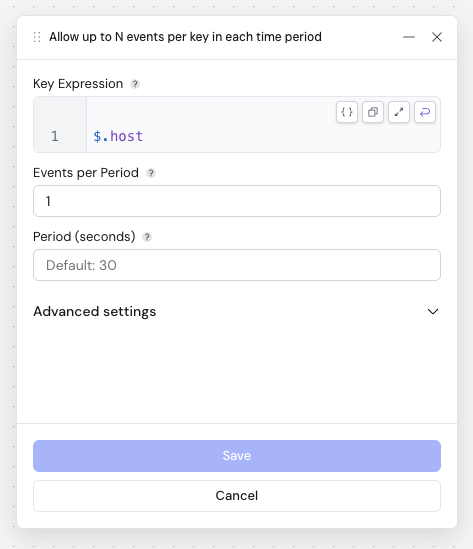
The node can't be saved while a field is invalid, for example when a number field contains a fraction or a value out of range.
Behavior
Periods
For each key, the first record opens a period of Period (seconds). The first Events per Period records of the key in that period pass; the rest are dropped. The first record after the period ends opens a new period and the count starts over. Time is measured when the record reaches the node, not from a timestamp inside the record.
The throttledCount field
When a key opens a new period and records were dropped in its previous period, the first record of the new period gets
a top-level throttledCount field set to the number of records dropped. If a key stops sending records, its last drop
count is not reported.
Records without a usable key
If the key expression returns null, an empty string, an object or an array, or fails to evaluate, the record passes
through unthrottled. To throttle on more than one field, join them into a single string with concat, for example
concat($.host, "|", $.event_type). A missing field becomes an empty string, so a record without event_type is
still throttled, under a key such as "web-1|".
Max Tracked Keys
When the number of distinct keys goes above Max Tracked Keys, the node first stops tracking keys that have had no
records for two periods, then the least recently seen keys. This check runs every 10,000 records that have a usable
key, so the number of tracked keys can go above the limit for a while. A key that is no longer tracked starts over on
its next record: more records than Events per Period can pass for it, and its pending throttledCount is lost.
Test runs
You can use the Throttle node in a test run. Test records reach the node within moments of each other, so they
normally fall into the same period: you will see the first Events per Period records of each key and no throttledCount field.
Replicas and resets
Throttle counters are kept in memory by each replica of the workflow. If a workflow runs with more than one replica, each replica applies the limit separately, so up to Events per Period × the number of replicas records of a key can pass in each period. Use one replica if the limit must be exact.
Redeploying or restarting the workflow resets every key. For a batch workflow, each scheduled run starts with empty counters.
Examples
With Key Expression $.host, Events per Period 2 and Period (seconds) 60:
| Arrival time | Input | Output |
|---|---|---|
| 0s | {"host": "a", "seq": 1} | {"host": "a", "seq": 1} |
| 40s | {"host": "a", "seq": 2} | {"host": "a", "seq": 2} |
| 50s | {"host": "a", "seq": 3} | dropped |
| 55s | {"host": "b", "seq": 4} | {"host": "b", "seq": 4} |
| 61s | {"host": "a", "seq": 5} | {"host": "a", "seq": 5, "throttledCount": 1} |
| 61s | {"host": "a", "seq": 6} | {"host": "a", "seq": 6} |
| 61s | {"host": "a", "seq": 7} | dropped |
Record 5 opens a new period because the period that started at 0s ended at 60s.