Sample Node
Quick Reference
- Rules: One or more rules, checked from top to bottom. Use Add Rule to add one, the arrows to reorder and the trash icon to remove.
- Condition: Inside each rule. FEEL expression; the rule takes a record only when it returns
true. Leave blank to take every record. - Sample Rate (1 in N): Inside each rule. Keep one record out of every N the rule takes. A whole number from
1to2,147,483,647. - Sample Rate Field: Advanced settings.
Configuration
Configuration keys below are relative to the node configuration. Use the field name in the panel when following instructions in the builder; required markers such as an asterisk are not part of the name.
| Field in the panel | Configuration key | Where to edit / when shown |
|---|---|---|
| Rules | rules | Node panel — Ordered list of rules. At least one rule is required. Required: Yes. |
| Condition | rules[].condition | Inside each rule — FEEL expression. The rule takes a record only when the expression returns true. Leave blank to take every record. Required: No. Placeholder: $.status == 200. |
| Sample Rate (1 in N) | rules[].sampleRate | Inside each rule — Keep one randomly picked record out of every N records the rule takes. A whole number from 1 to 2,147,483,647. Required: Yes. Placeholder: e.g. 10. |
| Sample Rate Field | sampleRateField | Advanced settings — Found under Advanced settings. Name of the top-level field added to every kept record. Leave blank to use the default. Required: No. Placeholder: Default: __sampled__. |
Overview
The Sample node keeps a random share of your records and drops the rest. Use it to cut down high-volume, low-value
data such as successful requests or debug logs while still keeping a representative set. Each rule picks the records it
applies to and a sample rate N: out of every N records the rule takes, one is kept at random. Each kept record gets a
field (by default __sampled__) set to N, so downstream systems can estimate the original volume. Records that no rule
takes pass through unchanged.
Setting behavior
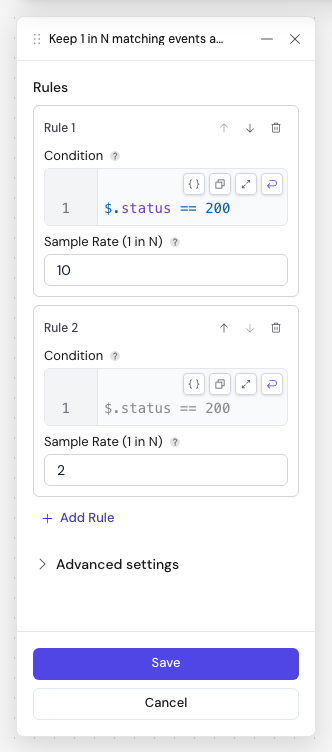
The example above keeps 1 in 10 records with status 200 and 1 in 2 of all other records. Rule 2's Condition is
blank; the grey $.status == 200 in it is only the placeholder.
A new Sample node has no rules; add at least one before saving. The node can't be saved while a field is invalid, for example when Sample Rate (1 in N) is empty, contains a fraction or is out of range, or when Condition contains only spaces.
If a rule without a condition has other rules below it, the panel warns that the rules below never match: the rule without a condition takes every record first.
Behavior
Rules
Rules are checked from top to bottom and the first rule that takes a record wins. A rule takes a record when its
Condition returns true, or always when its Condition is blank. A condition that returns anything other than
true, or fails to evaluate, does not take the record, and the next rule is checked. Records that no rule takes pass
through unchanged, without the sample rate field.
Groups of N
Each rule counts the records it takes in groups of Sample Rate (1 in N). From each group, one record is picked at
random and the others are dropped. The picked record is sent on when the last record of its group arrives, so it can
come out later than it came in and the output order can differ from the input order. With a sample rate of 1, every
record the rule takes is kept.
Which record is kept is random, so running the same input again can keep different records.
The sample rate field
Every kept record gets a top-level field named by Sample Rate Field (default __sampled__), set to the number of
records its group stood for. The name is used as is: sample.rate creates a field named sample.rate, not a nested
field. If the record already has a field with that name, it is overwritten.
Once input has ended, adding up this field over the kept records gives the number of records the rules took.
End of input
When input ends, each rule's last, incomplete group still keeps one of its records, tagged with the group's actual size instead of N. Input ends at the end of a test run, when a batch workflow finishes reading its source, or when the source stops because of an error.
Stopping, redeploying or restarting a running workflow does not end its input this way. Each rule's incomplete group is dropped: up to N − 1 records per rule that were taken but not yet sent on are lost, and they are not counted in any sample rate field.
Test runs
You can use the Sample node in a test run. Because the test run ends the input, you also see one record from each rule's last incomplete group, as in the example below.
Replicas and resets
Groups are kept in memory by each replica of the workflow. If a workflow runs with more than one replica, each replica forms its own groups.
After a redeploy or restart, every rule starts with an empty group. For a batch workflow, each scheduled run starts with empty groups.
Examples
With two rules, Condition $.status == 200 with Sample Rate (1 in N) 3, then a blank Condition with
Sample Rate (1 in N) 2, a test run on these records:
| Order | Input | Rule | Output |
|---|---|---|---|
| 1 | {"id": "a1", "status": 200} | Rule 1 | nothing yet |
| 2 | {"id": "a2", "status": 200} | Rule 1 | nothing yet |
| 3 | {"id": "a3", "status": 200} | Rule 1 | one of a1, a2, a3, for example {"id": "a2", "status": 200, "__sampled__": 3} |
| 4 | {"id": "a4", "status": 200} | Rule 1 | nothing yet |
| 5 | {"id": "b1", "status": 500} | Rule 2 | nothing yet |
| 6 | {"id": "b2", "status": 500} | Rule 2 | one of b1, b2, for example {"id": "b1", "status": 500, "__sampled__": 2} |
| 7 | {"id": "b3", "status": 500} | Rule 2 | nothing yet |
| End | {"id": "a4", "status": 200, "__sampled__": 1} and {"id": "b3", "status": 500, "__sampled__": 1} |
The test run outputs 4 records. Their __sampled__ values add up to 7, the number of input records.