PII Mask Node
Quick Reference
Target Fields
The list of field paths to scan for sensitive data. Use the + Add Field button to add each path. Paths use a dotted $-prefix notation and support two forms:
- Explicit —
$.fieldor$.parent.child: scans the string value at that exact path, or each string element if the leaf is an array. - Wildcard —
$.*or$.parent.*: navigates to the named prefix object, then recursively scans every string value in that subtree (including deeply nested objects and array elements). The*must be the last segment.
Only string values are scanned; numbers, booleans, and other types are always left unchanged.
Built-in Detectors Checkbox toggles for the bundled detectors:
- Phone Number
- SSN
- Credit Card
- IPv4 Address
- IPv6 Address
Custom Patterns User-defined regex matchers. Each pattern has:
- Name — internal identifier (e.g.
api_key). - Regex Pattern — the regular expression to match (e.g.
[A-Za-z0-9]{32}). - Replacement Token — the literal string substituted for every match (e.g.
[API_KEY]).
Use + Add Pattern to add more custom patterns.
Overview
The PII Mask node detects and masks sensitive substrings inside the fields you select. Built-in detectors cover common PII categories (email, phone, SSN, credit card, IPv4, IPv6), and you can add custom regex patterns for anything else — for example, API keys or internal IDs. Only the matched substring is replaced; the rest of the field value is left intact.
Configuration
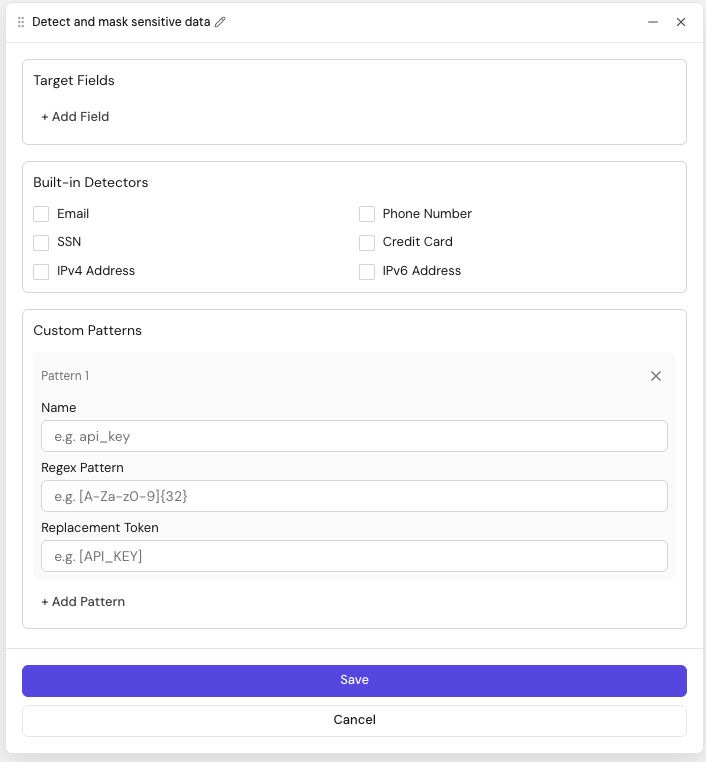
| Field | Description | Required | Default |
|---|---|---|---|
| Target Fields | Field paths whose string values will be scanned. Supports explicit paths ($.field, $.parent.child) and wildcard paths ($.*, $.parent.*). At least one path is required for the node to do any work. | Yes | — |
| Built-in Detectors | Enable any combination of: Email, Phone Number, SSN, Credit Card, IPv4 Address, IPv6 Address. Each enabled detector matches its pattern inside every target field. | No | all off |
| Custom Patterns | Zero or more custom regex matchers. Each entry needs a Name, a Regex Pattern, and a Replacement Token. | No | — |
Custom Pattern fields
| Field | Description | Required |
|---|---|---|
| Name | Identifier used in logs and error messages (e.g. api_key). | Yes |
| Regex Pattern | The regular expression to search for. | Yes |
| Replacement Token | The literal string used to replace each match (e.g. [API_KEY]). | Yes |
Behavior
For each record, the node walks every Target Field path and rewrites matched substrings in place:
- Explicit path (
$.field,$.parent.child): if the value is a string, all detectors and custom patterns run against it. If the value is an array, each string element is scanned individually. Non-string values and missing paths are skipped silently. - Wildcard path (
$.*,$.parent.*): the node navigates to the named prefix object, then recursively descends depth-first through all nested objects and arrays, scanning every string value it finds. Only the terminal.*is supported — wildcards in the middle of a path (e.g.,$.*.field) are invalid.
Every matched substring is replaced with the corresponding replacement token. The rest of the value is left intact.
Related Nodes
- Eval: Transform fields with FEEL expressions
- Enrichment: Add data from external lookup sources