Snowflake Sink Node
Snowflake has a Destination editor backed by a Snowflake data asset and connection profile, and a legacy editor with the fields below. The standalone node-type picker does not list Snowflake. Use the Destination asset selection available in your workflow; the presence of an editor alone does not confirm that a particular asset or deployment is ready.
The Snowflake Sink node writes processed data to Snowflake tables within configured databases and schemas using role-based access control and compute warehouse resources.
Snowflake is a cloud-based data warehousing platform designed to handle large-scale data storage, processing, and analysis. It offers seamless scalability, flexibility, and performance by separating compute and storage, allowing for efficient data operations. Snowflake enables organizations to consolidate data from various sources, perform complex queries, and gain valuable insights in real-time. By setting up a Snowflake connection node, users can manage their data operations, ensuring secure and accurate data handling across databases, schemas, and tables, while leveraging the platform's robust capabilities for optimal data warehousing and analytics.
Workflow Builder fields
Configuration keys below are relative to the node configuration. Use the field name in the panel when following instructions in the builder; required markers such as an asterisk are not part of the name.
Destination panel
Choose Asset Type and Asset Name first. Snowflake has no additional pipeline-settings inputs. A missing or unavailable asset is a reference problem, not proof that the connector does not exist.
The fields listed here are the complete set of editable inputs for this Destination type, subject to the stated visibility conditions.
| Field in the panel | Configuration key | Where to edit / when shown |
|---|---|---|
| Asset Type | UI only; no separate config key | Choose a Data Asset; UI selection determines the sink type on Save |
| Asset Name | dataAssetId | Choose a Data Asset; reference to the selected data asset |
Destination has no additional node settings after Asset Type and Asset Name. The Snowflake data asset owns Database, Schema, Table, and Warehouse. In Data Assets → Asset Information → Edit, existing Database, Schema, and Warehouse properties can be updated with Save → Save Changes. A property absent from the asset is not offered as an input. The Table input is visible, but Save rejects a changed table location: create a replacement asset for another table, select it in Asset Name, then Save. The Snowflake connection profile owns Account Identifier, authentication, and Role. Its Authentication Method is Key pair (the default: an unencrypted PKCS#8 PEM private key whose public key is registered on the Snowflake user) or Password or access token; see Connection Profiles. Edit Role on that profile in Settings → Connection Profiles; it is under + Show advanced options when creating a profile. Warehouse is not a profile setting, and Role is not an asset setting.
Legacy panel
Use this section only when the workflow opens the legacy editor. The legacy editor exposes the inline fields listed below; it follows the workflow read-only state. Asset-managed connection values can be read-only; see Managing Data Assets for available edits and the replacement-asset flow.
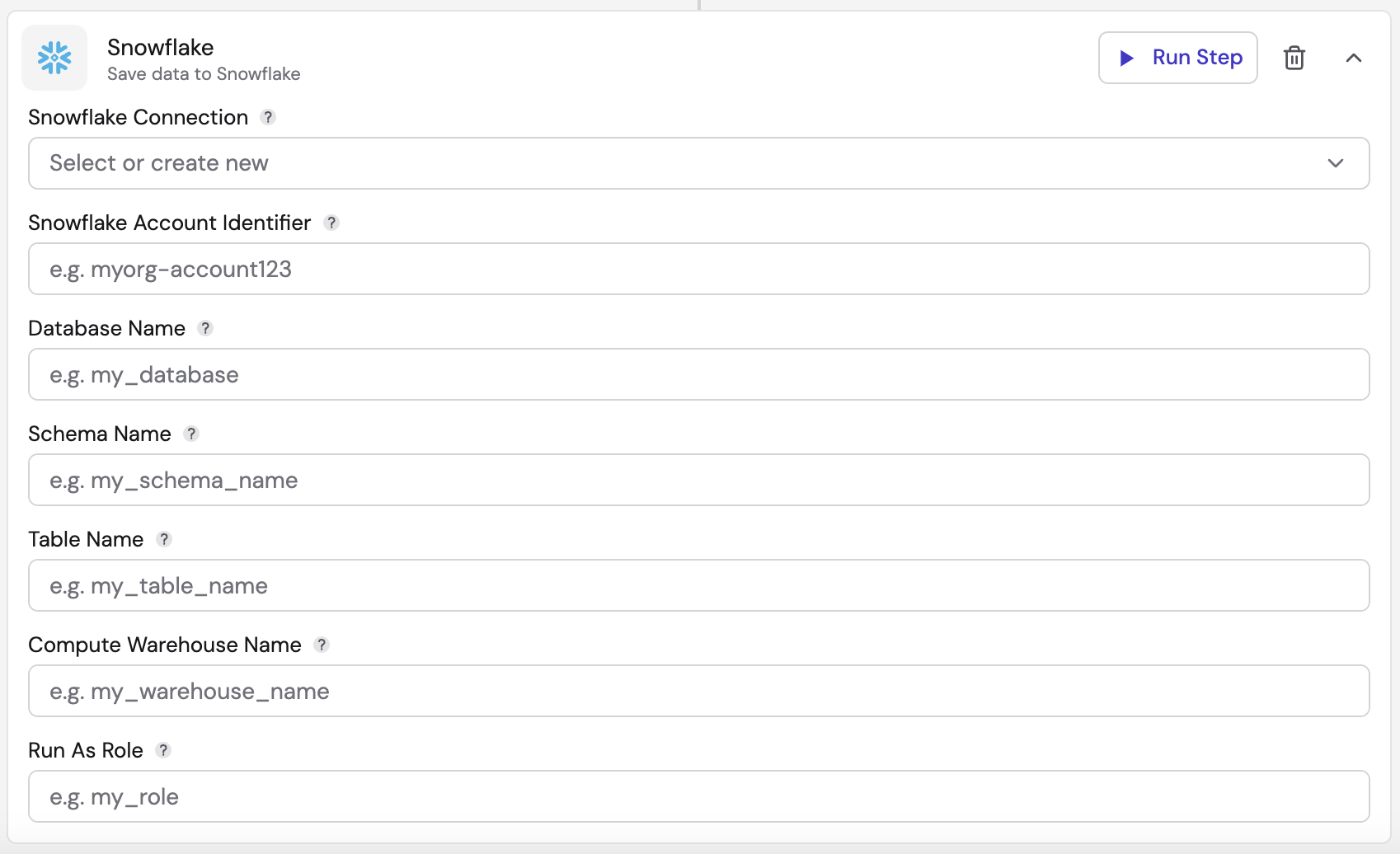
| Field in the panel | Configuration key | Where to edit / when shown |
|---|---|---|
| Snowflake Connection | credentialId | Legacy panel |
| Snowflake Account Identifier | accountIdentifier | Legacy panel |
| Database Name | database | Legacy panel |
| Schema Name | schema | Legacy panel |
| Table Name | table | Legacy panel |
| Compute Warehouse Name | warehouse | Legacy panel |
| Run As Role | role | Legacy panel |
Legacy configuration details
- Snowflake Connection: Select or create a new Snowflake connection by:
- Giving a name to the connection
- Inputting your Snowflake username
- Inputting your Snowflake password
- Click "Create"
- Snowflake Account Identifier: Enter the unique identifier for your Snowflake account. This identifier is essential for connecting to your Snowflake instance and distinguishes your account within your organization and across Snowflake's global network of supported cloud platforms and regions. It typically includes both the account name and organization name. This identifier allows Snowflake to route your requests to the correct account.
- Database Name: Input the name of the database where you intend to write the data. This field is case-sensitive, so ensure the name is entered exactly as it appears in Snowflake. The database acts as a container for your data, organizing related information in one place. It helps in segregating data and managing permissions and access control at a broader level.
- Schema Name: Specify the name of the schema within the database where the target table is located. This field is also case-sensitive, so enter the schema name accurately. A schema is a logical grouping of tables and other database objects (like views, functions, and procedures). It helps organize and manage these objects within a database, providing a structured way to categorize your data.
- Table Name: Provide the exact name of the table where you want to write the data. The table name is case-sensitive, so it must match exactly. A table is a structured collection of data, organized into rows and columns. This is where your actual data is stored, and specifying the correct table ensures that your data is written to the intended location within your schema and database.
- Compute Warehouse Name: Enter the name of the compute warehouse to be used for the operation. The compute warehouse provides the necessary resources for processing the data. In Snowflake, a compute warehouse is a virtual cluster of computing resources that perform data processing tasks. Specifying the correct warehouse ensures that your data operations have the required compute power and performance.
- Run As Role: Specify the role that has the required permissions to execute the operation. Ensure that the role name is correct and has the necessary privileges. In Snowflake, roles are used to control access to data and operations. The role you specify must have the appropriate permissions to read, write, and manage the data and objects involved in your operation. This ensures that the operation is executed securely and with the necessary authorizations.
How records are written
When the workflow starts, the sink reads the target table's columns and inserts one row per record.
- Field-to-column matching: each column is matched to the record field with the same name, then case-insensitively. Snowflake stores unquoted column names in upper case, so a record field
event_typefills columnEVENT_TYPE. - Missing fields: a column with no matching field is written as
NULL. - No matching fields: a record that matches no writable column is rejected with an error instead of inserting an empty row.
- Objects and arrays: values for
VARIANTcolumns, and forOBJECTorARRAYcolumns declared without element or field types, are written as JSON. StructuredOBJECT,ARRAY, andMAPcolumns (declared with types) are left empty: a record that has a value for one is rejected, so leave that field out. If such a column isNOT NULLwithout a default, the sink cannot write to the table. - Type mismatches: a record whose field cannot be written to its column, such as an object for a
NUMBERcolumn, is rejected with an error naming the field and column. Other records are still written. - Names: the table and its column names must be plain unquoted identifiers (letters, digits,
_and$, starting with a letter or_).
Troubleshooting
| Error | Cause and fix |
|---|---|
Illegal base64 character | The private key on the connection profile contains text that is not part of a PEM key, for example a shortened or placeholder value. Paste the complete unencrypted PKCS#8 key. |
A username and password or a private key must be specified | The connection has no usable credential. Check the connection profile. |
table column names is empty | The sink found no columns for the table. Check Database, Schema, and Table, and that the role can access the table. A Snowflake data asset stores these names in upper case; in the legacy editor, enter them as Snowflake stores them (usually upper case). |
... is not a valid Snowflake identifier | The table or a column name needs quoting in Snowflake. Rename it to a plain identifier. |
structured OBJECT/ARRAY/MAP column(s) ... are declared NOT NULL without a default | Make those columns nullable, give them a default, or use VARIANT, OBJECT, or ARRAY without declared types. |
No record field matches any column of the target table | The records are shaped for a different table. Rename fields to match the columns. |
| Connection or insert failure | Check the account identifier, credentials, role, and warehouse. When an insert fails, every record in that batch is reported as failed. |