Splunk HEC Sink Node
Quick Reference
HEC URL
The full Splunk HTTP Event Collector endpoint URL.
ex: https://splunk.example.com:8088/services/collector/event
HEC Token Credential API-key credential holding the HEC token used to authenticate with Splunk.
Index
Target Splunk index. If omitted, records land in the default index configured on the HEC token.
ex: main
Sourcetype
The sourcetype field attached to each record.
ex: _json
Source
The source field attached to each record.
ex: fleak
Batch Size
Number of records sent per HEC request. Default: 500.
Verify SSL Certificates
When enabled, validates the Splunk endpoint's TLS certificate. Disable only for self-signed dev clusters. Default: true.
Overview
The Splunk HEC Sink node forwards records from your workflow to Splunk through the HTTP Event Collector. Records are buffered and sent in batches, and you can tag every record with a specific index, sourcetype, and source. Authentication uses an API-key credential holding the HEC token.
Configuration
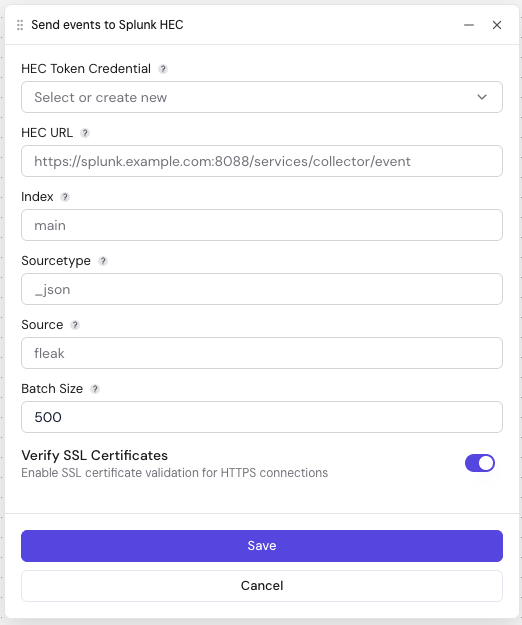
| Field | Description | Required | Default |
|---|---|---|---|
| HEC URL | Full HEC endpoint, including scheme (http:// or https://) and the /services/collector/event path. | Yes | — |
| HEC Token Credential | API-key credential whose value is the HEC token issued by your Splunk admin. | Yes | — |
| Index | Splunk index name. Leave blank to use the default index configured on the token. | No | — |
| Sourcetype | Value assigned to the record's sourcetype field (e.g. _json). | No | — |
| Source | Value assigned to the record's source field (e.g. fleak). | No | — |
| Batch Size | Number of records sent in a single HEC request. | No | 500 |
| Verify SSL Certificates | Validate the Splunk endpoint's TLS certificate. Turn off only for self-signed development clusters. | No | true |
Related Nodes
- Splunk Source: Pull records from a Splunk search
- S3 Sink: Write batched records to Amazon S3