Pub/Sub Sink Node
Quick Reference
Google Pub/Sub Integration The integration that supplies the GCP project ID and service-account credential used to publish messages.
Topic
The Pub/Sub topic to publish to. Use the topic's short ID, not its full resource path.
ex: my-topic
Encoding The format used to serialize records into the message payload.
Batch Size
Maximum number of messages buffered before a publish request is sent. Range: 1–1000. Default: 100.
Ordering Key Expression
Optional FEEL expression that returns the ordering key for each message. When set, messages with the same key are delivered in order to a subscriber that has message ordering enabled.
ex: $.userId
Overview
The Pub/Sub Sink node publishes each record from your workflow as a message to a Google Cloud Pub/Sub topic. Messages are buffered and flushed in batches for throughput, and an optional ordering-key expression lets you route related messages in sequence. Project ID and credentials come from the Pub/Sub integration you select.
Configuration
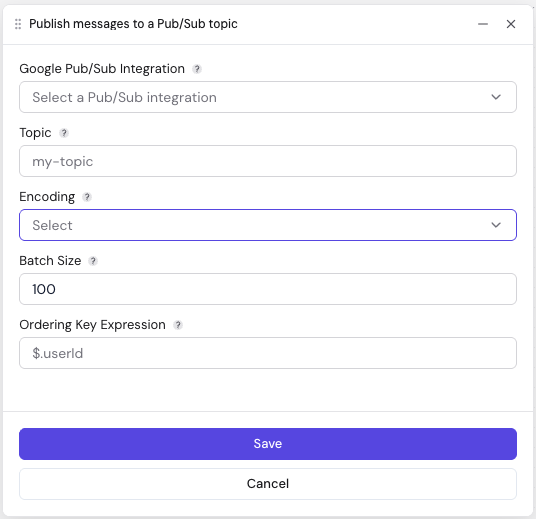
| Field | Description | Required | Default |
|---|---|---|---|
| Google Pub/Sub Integration | Selects the GCP project ID and credential used for this topic. | Yes | — |
| Topic | Pub/Sub topic short ID (e.g. my-topic). The project comes from the integration. | Yes | — |
| Encoding | Format used to serialize each record. Options: CSV, JSON Object, JSON Array, JSON Lines. More info here. | Yes | — |
| Batch Size | Maximum number of messages buffered before a publish is issued (1–1000). | No | 100 |
| Ordering Key Expression | FEEL expression that returns the ordering key for each message (e.g. $.userId). Pub/Sub preserves ordering for messages sharing a key when message ordering is enabled on the subscription. | No | — |
Related Nodes
- Pub/Sub Source: Consume messages from a Pub/Sub subscription
- Kafka Sink: Publish records to a Kafka topic