Datadog Logs Sink Node
Quick Reference
In Destination, choose Asset Type and Asset Name, then open Configure Pipeline Settings. The fields listed here are the complete set of editable inputs for this Destination type, subject to the stated visibility conditions.
- Asset Type: Choose a Data Asset; UI selection determines the sink type on Save.
- Asset Name: Choose a Data Asset; reference to the selected data asset.
- Batch Size: Configure Pipeline Settings.
Destination has no Source, Service, Tags, site, or credential inputs. To change the asset defaults, open the owned asset in Data Assets → Asset Information → Edit, update Source, Service, or Tags, then Save → Save Changes. All three inputs are available even when a value was not previously stored; no replacement asset is needed for these edits. Site is read-only in this form. The Datadog connection profile owns Site and API Key; edit those in Settings → Connection Profiles.
Configuration
Configuration keys below are relative to the node configuration. Use the field name in the panel when following instructions in the builder; required markers such as an asterisk are not part of the name.
Destination panel
Choose Asset Type and Asset Name first. Type-specific inputs appear in Configure Pipeline Settings after an asset is selected; an asset error can prevent that section from appearing. A missing or unavailable asset is a reference problem, not proof that the connector does not exist.
The fields listed here are the complete set of editable inputs for this Destination type, subject to the stated visibility conditions.
| Field in the panel | Configuration key | Where to edit / when shown |
|---|---|---|
| Asset Type | UI only; no separate config key | Choose a Data Asset; UI selection determines the sink type on Save |
| Asset Name | dataAssetId | Choose a Data Asset; reference to the selected data asset |
| Batch Size | batchSize | Configure Pipeline Settings; required to save Destination — Number of records sent in a single intake request. Minimum: 1. Default: 500. Required: Yes. |
Destination has no Source, Service, Tags, site, or credential inputs. To change the asset defaults, open the owned asset in Data Assets → Asset Information → Edit, update Source, Service, or Tags, then Save → Save Changes. All three inputs are available even when a value was not previously stored; no replacement asset is needed for these edits. Site is read-only in this form. The Datadog connection profile owns Site and API Key; edit those in Settings → Connection Profiles.
Legacy panel
Use this section only when the workflow opens the legacy editor. Asset-managed connection values can be read-only; see Managing Data Assets for available edits and the replacement-asset flow.
| Field in the panel | Configuration key | Where to edit / when shown |
|---|---|---|
| Connection Profile | connectionProfileId | Legacy panel; hidden when dataAssetId is set — Select or create a Datadog connection profile. It supplies the Datadog site (region, e.g. datadoghq.com), which derives the intake endpoint, and the API key, sent in the DD-API-KEY header. Required: Yes. |
| Source | ddsource | Advanced Settings; hidden for an asset-managed node — Default ddsource injected into each log. Applied only when the record does not already carry a ddsource. Required: No. |
| Service | service | Advanced Settings; hidden for an asset-managed node — Default service injected into each log. Applied only when the record does not already carry a service. Required: No. |
| Tags | ddtags | Advanced Settings; hidden for an asset-managed node — Default ddtags (comma-separated) injected into each log. Applied only when the record does not already carry ddtags. Required: No. |
| Batch Size | batchSize | Advanced Settings — Number of records sent in a single intake request. Minimum: 1. Default: 500. Required: No. |
Overview
The Datadog Logs Sink node forwards records from your workflow to Datadog Logs through the Datadog HTTP logs intake API. Records are buffered and sent in batches, and you can attach a default ddsource, service, and ddtags to every record. Authentication and region are supplied by a Datadog connection profile, which holds the Datadog site and API key.
Setting behavior
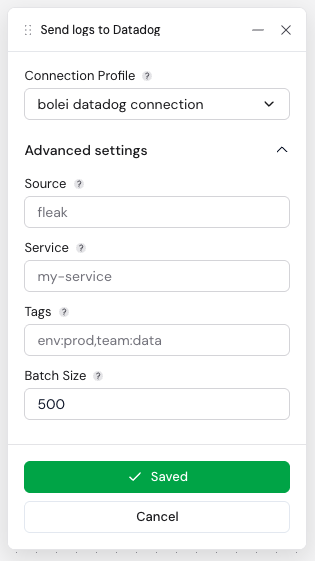
Connection Profile
The connection profile determines both where and how logs are delivered. Its site selects the Datadog region and derives the intake endpoint https://http-intake.logs.<site>/api/v2/logs — common values are datadoghq.com (US1, default), datadoghq.eu (EU1), us3.datadoghq.com, us5.datadoghq.com, and ap1.datadoghq.com. Its API key is sent in the DD-API-KEY header on every request.
Source, Service, and Tags
For Destination, change the data asset defaults in Data Assets → Asset Information → Edit using Source, Service, and Tags, then Save → Save Changes. All three inputs are available even if previously blank. Re-deploy affected workflows to use the updated asset. The unmanaged legacy panel exposes these fields under Advanced Settings; an asset-managed legacy node hides them.
Source, Service, and Tags set defaults for the Datadog reserved attributes ddsource, service, and ddtags. Each default is injected only when the incoming record does not already contain that attribute, so per-record values coming from upstream nodes are preserved. Leave a field blank to send whatever the record already carries (or nothing).
Batch Size
Records accumulate in memory until the batch reaches this size, at which point the node serializes the batch as a single JSON array and POSTs it to the logs intake endpoint. Larger batches reduce request overhead; smaller batches lower memory usage and keep latency tighter.
Examples
Example: Ship Workflow Logs to Datadog
Use this node when you want every record produced by the workflow to land in Datadog Logs.
- In Destination, choose Asset Type and Asset Name for the Datadog destination. Configure its connection profile for the target region and account.
- Set the data asset's Source to identify the origin of the logs — for example
fleak. For an existing asset, edit Source, Service, and Tags in Asset Information → Edit, then Save → Save Changes. An unmanaged legacy node sets these defaults under Advanced Settings. - Set Service to the service name the logs should be grouped under — for example
my-service. - Add Tags such as
env:prod,team:datato make the logs easy to filter in Datadog.
Example: Preserve Per-Record Metadata
Because Source, Service, and Tags are applied only when the record does not already carry them, upstream nodes can set ddsource, service, or ddtags on individual records and those values win. Use the asset values in Destination, or the unmanaged legacy node fields, to supply a fallback for records that do not set their own.
Error Handling
Each batch is sent as a single POST to the Datadog logs intake API. A non-success HTTP response fails the entire batch, which is then routed to the configured error handling.
Related Nodes
- Splunk HEC Sink: Forward workflow records to Splunk via the HTTP Event Collector
- Kafka Sink: Publish workflow records to a Kafka topic